Survive On A Raft Script: Auto Collect Box, Infinite Revive, Upgrade Crafting Table & Features Guide
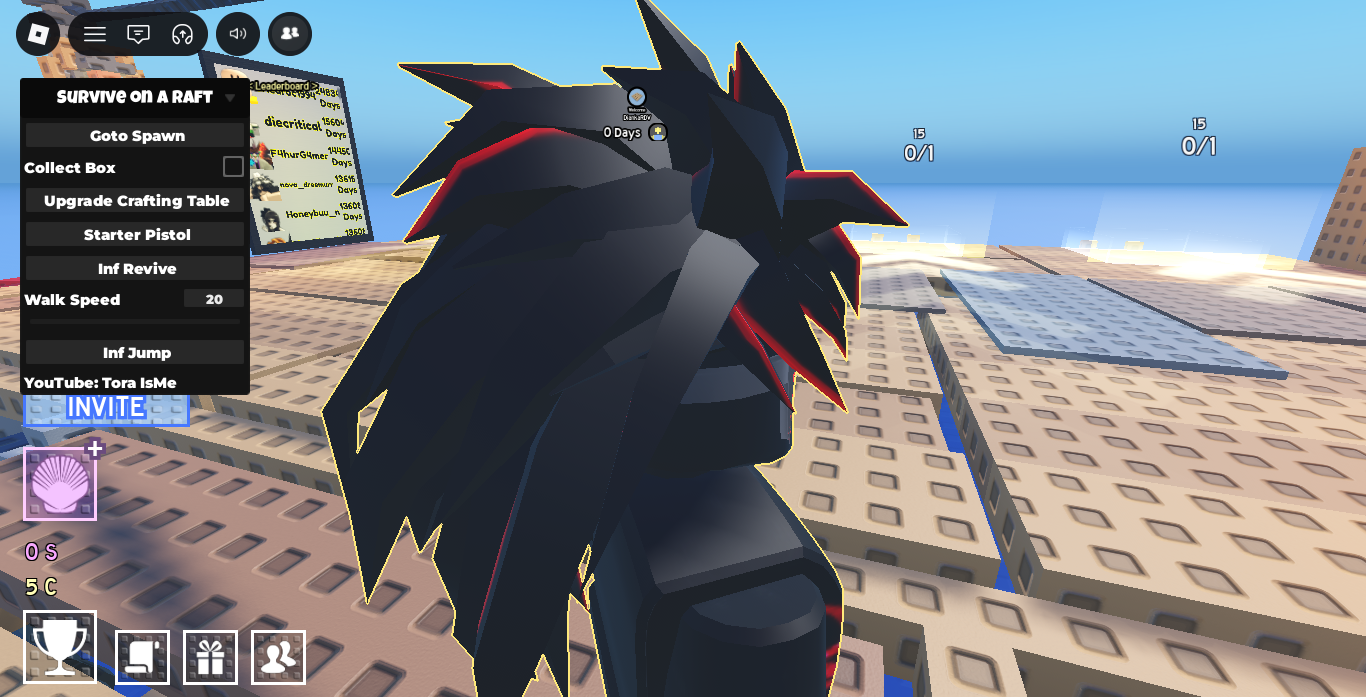
If you are looking for an updated and functional script for Survive On A Raft on Roblox, this comprehensive guide covers everything you need to know. Automate your resource collection, upgrade your crafting capabilities instantly, and ensure uninterrupted survival against floating hazards and ocean challenges.
What is Survive On A Raft?
Survive On A Raft is a popular Roblox ocean survival simulator where players start on a tiny wooden platform in the middle of the sea. Players must gather floating crates, craft vital gear, expand their raft, and survive night cycles filled with harsh conditions. Manually collecting boxes as they float past can be slow and repetitive, especially when trying to gather enough materials for advanced crafting tiers.
Using an automation script allows you to auto-collect floating crates, instantly upgrade your crafting station, grant infinite revives, and boost movement capabilities for seamless gameplay.
Key Script Features
This feature-packed menu developed by Tora IsMe provides essential utilities to streamline your raft expansion and survival:
- Auto Collect Box: Automatically detects and teleports floating loot boxes and supply crates directly to your inventory without manual fishing.
- Upgrade Crafting Table: Instantly triggers crafting table upgrades to unlock high-tier recipes without grinding resource requirements.
- Unlock Starter Pistol: Unlocks defense weapons automatically to keep your raft safe during night events.
- Infinite Revive (Inf Revive): Automatically revives your character upon taking lethal damage or falling into dangerous hazards.
- Movement Enhancements (Walk Speed & Inf Jump): Grants customizable walk speed (default 20+) and infinite jump toggles to navigate expanded rafts effortessly.
- Goto Spawn: Quick-teleport action to instantly return to your raft’s central spawning platform.
Survive On A Raft Script Code
Copy the Lua script snippet below to execute the full Tora IsMe menu GUI:
Lua
loadstring(game:HttpGet("https://raw.githubusercontent.com/ToraIsMe/ToraIsMe/main/0SurviveOnARaft"))()
How to Install & Execute the Script
Follow these step-by-step instructions to run the script safely in Roblox:
- Launch Roblox: Open the Roblox app and join Survive On A Raft.
- Attach Your Executor: Open your preferred execution software (such as Delta, Hydrogen, Codex, or Wave) and attach it to the game instance.
- Copy the Code: Highlight and copy the Lua loadstring provided above.
- Execute: Paste the script into the executor text box and click Execute.
- Enable Features: Use the on-screen menu panel to toggle options like Collect Box, Inf Revive, and speed modifiers.
Tips for Maximizing Survival & Farm Efficiency
- Keep Auto Collect Enabled: Leaving Collect Box active ensures a steady flow of materials like wood, apples, and building components to fill your storage lockers.
- Upgrade Crafting Table Early: Use the instant table upgrade feature early in your session so you can produce advanced survival items like loot catchers and gear right away.
- Set Safe Walk Speeds: A walk speed setting between 20 and 30 provides quick movement across large rafts while keeping movement smooth and natural.
Frequently Asked Questions (FAQ)
Does the Auto Collect feature work while AFK?
Yes, once Collect Box is checked, the script continues to collect incoming crates floating past your raft even while you are AFK.
What should I do if the menu interface does not open?
Ensure your executor is completely updated to the latest build. If the script fails to load, rejoin the server and re-execute the loadstring code.
Leave a Reply