Adopt Me continues to be one of the most popular Roblox games of 2026, and seasonal events like the Valentine’s event bring exclusive limited pets, decorations, and rewards that are only available for a short window. Farming enough bucks to participate in everything a seasonal event offers — buying exclusive eggs, trading event items, and collecting limited rewards — requires hours of repetitive grinding that most players simply do not have time for.
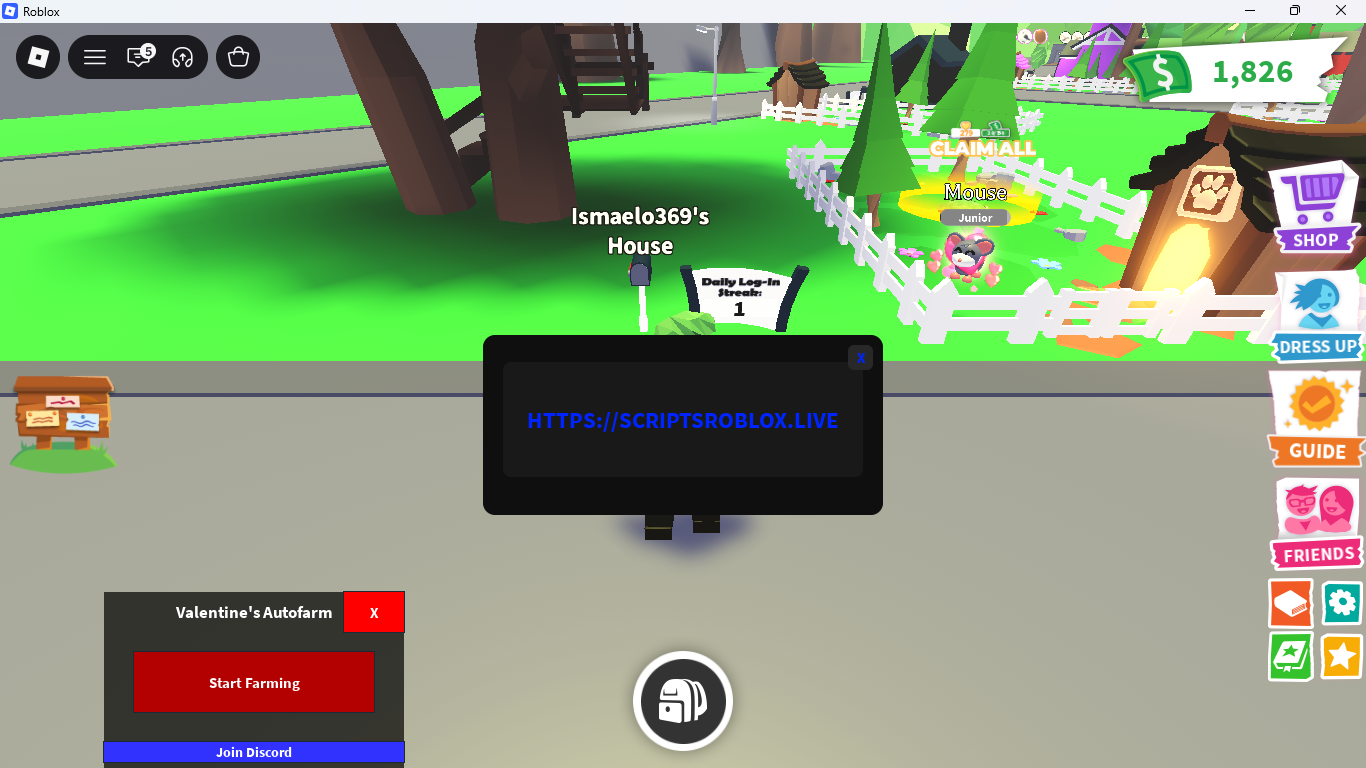
The Valentine’s Autofarm script for Adopt Me solves this with a single-click solution. Hit Start Farming and the script handles bucks collection automatically, letting you rack up passive income while you focus on trading and enjoying the event. There is also a community Discord linked directly from the menu for updates, support, and patch notifications.
Key Script Features
- Start Farming: One-click button that immediately begins automated bucks farming — no configuration needed.
- Minimal UI: A clean, no-clutter menu with no toggles to configure and no settings to navigate. Press Start and it works.
- Join Discord: Direct link to the script’s community Discord for update announcements and support.
- No Key System: The script loads immediately with no key, no redirect, and no Linkvertise page.
- Event-Ready: Designed specifically for Adopt Me’s Valentine’s seasonal event, optimized for the current map and reward structure.
Gameplay Comparison Table
| Feature | Standard Gameplay | With Valentine’s Autofarm |
|---|---|---|
| Bucks Farming | Manual Pay collection every few minutes | Automated farming runs continuously in the background |
| Event Participation | Limited by how many bucks you can earn manually | Passive bucks income funds all event purchases |
| Setup Time | No setup needed | No setup needed — one button press |
| Session Management | Must stay active to collect | Runs passively without manual interaction |
| Community Support | No direct support link | Join Discord button for patch updates and help |
Script Features

| Feature | What It Does | Type |
|---|---|---|
| Start Farming | Immediately begins automated bucks farming | Button |
| Join Discord | Opens the script community Discord for support and updates | Button |
Adopt Me Valentine’s Autofarm Script
loadstring(game:HttpGet("https://raw.githubusercontent.com/ValentinesAutofarm/main/ValentinesAutofarm.lua"))()
How to Execute the Script
- Launch Roblox and start Adopt Me.
- Wait until the game fully loads and your character appears in the neighborhood.
- Open your preferred Lua executor (Delta, Fluxus, Synapse Z, or KRNL).
- Copy the loadstring from the code block above.
- Paste it into your executor’s text box and click Execute.
- The Valentine’s Autofarm menu appears in the bottom-left corner of the screen.
- Press Start Farming — the script immediately begins collecting bucks automatically.
Compatible Executors
| Executor | Price | Platform | Compatibility |
|---|---|---|---|
| Synapse Z | Paid (~$10) | PC | ✅ Full |
| Delta | Free | PC | ✅ Full |
| Fluxus | Free | PC | ✅ Full |
| KRNL | Free | PC | ⚠️ Partial |
| Hydrogen | Free | Mobile | ⚠️ Mobile only |
| Arceus X | Free | Mobile | ⚠️ Mobile only |
Why Use a Dedicated Event Script?
Seasonal events in Adopt Me are time-limited. The Valentine’s event introduces exclusive eggs, pets, and decorations that cannot be obtained after the event ends. Players who farm enough bucks during the event window can buy everything available and stockpile tradeable items — which become significantly more valuable once the event closes.
The Valentine’s Autofarm is built specifically for this event’s reward structure. A general-purpose Adopt Me script works year-round but a dedicated event script is optimized for the specific tasks and locations active during the event, making it faster and more reliable for the current season.
Strategic Tips
1. Run the Script During Long Sessions or Overnight
Since Valentine’s Autofarm requires only one button press to start, it is ideal for sessions where you leave Roblox running in the background. Start the farm before going to bed or stepping away from the computer and come back to significantly more bucks accumulated.
2. Join the Discord for Patch Notifications
Adopt Me updates frequently during active events. When a patch drops and breaks the script, the Discord community is the fastest way to find out when an updated version is available. The Join Discord button in the menu takes you there directly — join it immediately after executing so you are notified without having to check manually.
3. Combine With Manual Trading During Farming Sessions
While Valentine’s Autofarm handles bucks collection automatically, you can use that time to trade event items with other players from the neighborhood. Farming and trading simultaneously is the most efficient way to maximize your event progression within the limited event window.
Troubleshooting & Solutions
- Script menu does not appear after executing: Re-attach your executor while Adopt Me is running and execute again. Make sure the game is fully loaded before injecting.
- Start Farming button does nothing: The game may need a moment to initialize after the script loads. Wait 5–10 seconds and press the button again.
- Script stopped working after a game update: Adopt Me patches frequently during active events. Join the Discord linked in the script menu for update notifications, or check back on this page for an updated loadstring within 24–48 hours.
- Bucks not increasing after farming starts: Verify that you have at least one pet in your inventory. Adopt Me’s bucks generation system requires an active pet to generate pay income.
Frequently Asked Questions (FAQ)
Does Valentine’s Autofarm work outside of the Valentine’s event?
The script is built and optimized for the Valentine’s seasonal event in Adopt Me. It may still function for general bucks farming outside the event period, but its primary purpose is event-specific farming. For a year-round full-featured Adopt Me script with Auto Farm, Teleport, Fishing, and House Cloner, check our full Adopt Me script post.
Does this script require a key to run?
No. Valentine’s Autofarm loads immediately with no key system. Execute the loadstring and the menu appears in the bottom-left corner of the screen. Press Start Farming and it begins instantly — no key, no countdown, no redirect.
Is there a configuration menu or settings I need to set up?
No. The entire menu consists of two buttons: Start Farming and Join Discord. There are no toggles to configure and no settings to navigate. It is designed to be as simple as possible — one click and it works.
What does Join Discord do?
Pressing Join Discord opens the script developer’s community Discord server in your browser. The Discord is where the developer posts patch updates, new script releases, and provides user support. It is the fastest way to find out when a fix is available after a game update breaks the script.
Can I get banned for using this script in Adopt Me?
Yes. Using any third-party script in Roblox violates the platform’s Terms of Service and carries a risk of account suspension. This risk is higher if your account holds valuable pets, rare limited items, or a large bucks balance. Always run scripts on a dedicated secondary account rather than your main trading account.
How long does it take to farm a significant amount of bucks?
The exact rate depends on your current pets and in-game multipliers. With Auto Farm running continuously overnight — typically 6 to 8 hours — most players accumulate enough bucks to purchase multiple event eggs or shop items. Adding a high-value pet with a bucks multiplier before starting the farm increases the rate significantly.
The script worked before but stopped after I relaunched Roblox. Why?
Scripts do not persist between Roblox sessions. Every time you relaunch Roblox or rejoin Adopt Me, you need to re-execute the script loadstring through your executor. This is normal behavior for all Roblox scripts — the script must be injected fresh each session.
Disclaimer: This content is for educational purposes only. Using third-party scripts in Roblox may violate Roblox’s Terms of Service and result in account suspension. Always use scripts on a secondary account. We are not responsible for any consequences resulting from the use of scripts found on this site.
Leave a Reply