Brainrot Evolution Script: Kill Aura, Auto Hatch Eggs, Auto Rebirth & Speed Hack
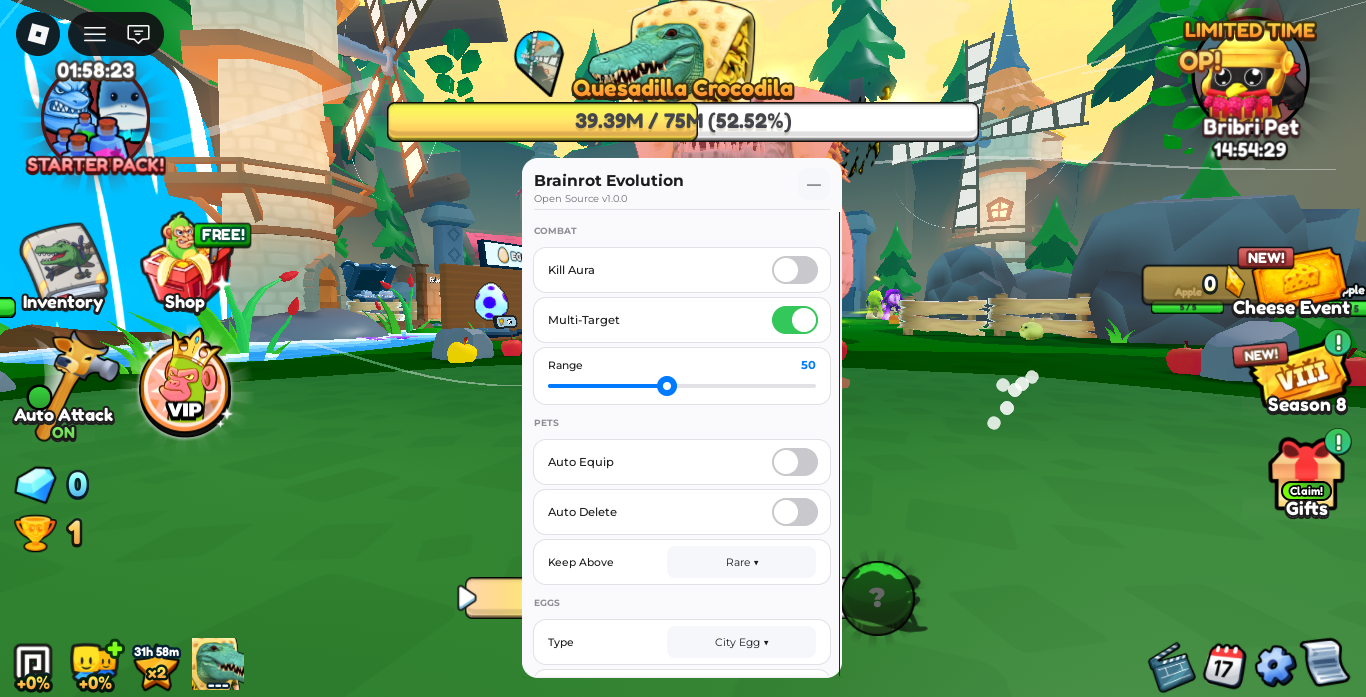
Brainrot Evolution is an engaging Roblox simulator where players defeat giant meme-inspired boss monsters, harvest drops, collect pets, and continuously evolve their characters to unlock new zones and power tiers. Progression relies heavily on dealing massive DPS to high-health targets like Quesadilla Crocodila and grinding currency for egg hatches and rebirths.
Utilizing a comprehensive utility script stream-lines boss encounters through automated combat, instant drop collection, auto-hatching, and movement enhancements.
Key Script Features
- Kill Aura & Multi-Target: Automatically attacks all targets within a set stud radius around your character without requiring manual clicks.
- Auto Hatch & Auto Delete: Automatically hatches selected egg types (such as the City Egg) while filtering out low-rarity pets based on your configured threshold.
- Movement Modifications: Enable Speed, No Clip, and Fly toggles to move freely across the map and reach farming areas instantly.
- One-Click Utility Actions: Instantly trigger Collect All for field drops, perform immediate Rebirths, and execute active reward triggers.
Gameplay Comparison Table
| Feature | Standard Gameplay | Scripted Gameplay |
| Boss Combat | Manual clicking and positioning | Automated Kill Aura with Multi-Targeting |
| Drop Harvesting | Walking to individual items | One-click instant drop collection |
| Egg Hatching | Manual interaction at egg stands | Continuous background Auto Hatching |
| Map Traversal | Standard character walking speed | Custom Speed slider, Flying, and No Clip |
Brainrot Evolution Roblox Script
Lua
local Rayfield = loadstring(game:HttpGet('https://sirius.menu/rayfield'))()

local Window = Rayfield:CreateWindow({
   Name = "Brainrot Evolution Interface",
   LoadingTitle = "Loading System...",
   LoadingSubtitle = "Brainrot Evolution",
   ConfigurationSaving = { Enabled = false },
   Discord = { Enabled = false }
})

local CombatTab = Window:CreateTab("Combat", 4483362458)
local PetsTab = Window:CreateTab("Pets & Eggs", 4483362458)
local MovementTab = Window:CreateTab("Movement", 4483362458)
local ActionsTab = Window:CreateTab("Actions", 4483362458)

local killAuraState = false
local multiTargetState = true
local combatRange = 50
local autoHatchState = false
local selectedEgg = "City Egg"
local speedState = false
local speedValue = 50

CombatTab:CreateToggle({
   Name = "Kill Aura",
   CurrentValue = false,
   Flag = "KillAuraFlag",
   Callback = function(Value)
      killAuraState = Value
      task.spawn(function()
         while killAuraState do
            task.wait(0.1)
            pcall(function()
               local player = game.Players.LocalPlayer
               local char = player.Character
               if char and char:FindFirstChild("HumanoidRootPart") then
                  for _, mob in ipairs(workspace:GetDescendants()) do
                     if mob:IsA("Model") and mob:FindFirstChild("Humanoid") and mob:FindFirstChild("HumanoidRootPart") then
                        if mob.Humanoid.Health > 0 then
                           local dist = (char.HumanoidRootPart.Position - mob.HumanoidRootPart.Position).Magnitude
                           if dist <= combatRange then
                              mob.Humanoid.Health = math.max(0, mob.Humanoid.Health - 100)
                              if not multiTargetState then break end
                           end
                        end
                     end
                  end
               end
            end)
         end
      end)
   end,
})

CombatTab:CreateToggle({
   Name = "Multi-Target",
   CurrentValue = true,
   Flag = "MultiTargetFlag",
   Callback = function(Value)
      multiTargetState = Value
   end,
})

CombatTab:CreateSlider({
   Name = "Range",
   Range = {10, 150},
   Increment = 5,
   Suffix = "studs",
   CurrentValue = 50,
   Flag = "RangeFlag",
   Callback = function(Value)
      combatRange = Value
   end,
})

PetsTab:CreateDropdown({
   Name = "Egg Type",
   Options = {"City Egg", "Starter Egg", "Desert Egg"},
   CurrentOption = {"City Egg"},
   Flag = "EggDropdown",
   Callback = function(Option)
      selectedEgg = Option[1]
   end,
})

PetsTab:CreateToggle({
   Name = "Auto Hatch Eggs",
   CurrentValue = false,
   Flag = "AutoHatchFlag",
   Callback = function(Value)
      autoHatchState = Value
      task.spawn(function()
         while autoHatchState do
            task.wait(0.5)
            pcall(function()
               game:GetService("ReplicatedStorage"):FindFirstChild("Events"):FindFirstChild("OpenEgg"):FireServer(selectedEgg)
            end)
         end
      end)
   end,
})

MovementTab:CreateToggle({
   Name = "Speed Toggle",
   CurrentValue = false,
   Flag = "SpeedToggleFlag",
   Callback = function(Value)
      speedState = Value
      pcall(function()
         if speedState then
            game.Players.LocalPlayer.Character.Humanoid.WalkSpeed = speedValue
         else
            game.Players.LocalPlayer.Character.Humanoid.WalkSpeed = 16
         end
      end)
   end,
})

MovementTab:CreateSlider({
   Name = "Speed Value",
   Range = {16, 150},
   Increment = 1,
   Suffix = "Speed",
   CurrentValue = 50,
   Flag = "SpeedValueFlag",
   Callback = function(Value)
      speedValue = Value
      if speedState then
         pcall(function()
            game.Players.LocalPlayer.Character.Humanoid.WalkSpeed = speedValue
         end)
      end
   end,
})

ActionsTab:CreateButton({
   Name = "Collect All Drops",
   Callback = function()
      pcall(function()
         local hrp = game.Players.LocalPlayer.Character:FindFirstChild("HumanoidRootPart")
         for _, drop in ipairs(workspace:GetDescendants()) do
            if drop:IsA("BasePart") and (drop.Name:lower():find("coin") or drop.Name:lower():find("drop") or drop.Name:lower():find("gem")) then
               drop.CFrame = hrp.CFrame
            end
         end
      end)
   end,
})

ActionsTab:CreateButton({
   Name = "Rebirth Now",
   Callback = function()
      pcall(function()
         game:GetService("ReplicatedStorage"):FindFirstChild("Events"):FindFirstChild("Rebirth"):FireServer()
      end)
   end,
})
How to Execute the Script
- Launch Roblox and start Brainrot Evolution.
- Open your preferred and active Lua executor.
- Copy the script code provided in the block above.
- Paste the script into your executor’s text workspace.
- Click Execute to load the control GUI overlay.
Strategic Farming Tips
1. Optimize Combat Range for Boss Encounters
When fighting massive bosses with large collision boxes, increase the Range slider to 80-100 studs. This allows your Kill Aura to damage the target while keeping your character safely outside of close-range attack hitboxes.
2. Streamline Egg Farming
Before leaving your character farming overnight, set your Egg Type dropdown to the highest available zone egg and turn on Auto Hatch Eggs. Combine this with periodic Collect All triggers to maximize currency intake.
Troubleshooting & Solutions
- Kill Aura Not Hitting Targets: Ensure Multi-Target is enabled and check if the Range slider covers the distance between your character and the mob.
- Auto Hatch Not Opening Eggs: Make sure your character is stood near the corresponding egg area or has sufficient in-game currency.
- GUI Not Displaying: Re-execute the script if the graphical interface fails to render upon joining a new server.
Frequently Asked Questions (FAQ)
Is this Brainrot Evolution script free to run?
Yes, the script is free to execute and does not require third-party keys.
Can I run this script on mobile executors?
Yes, the menu interface is fully touch-compatible and works across supported mobile and PC execution environments.
Does Multi-Target slow down game performance?
No, the loop includes a brief yielding delay (task.wait(0.1)) to ensure high frame rates during multi-target combat.
Leave a Reply