Kick a Brainrot Script 2026: Auto Kick, Auto Collect, FPS Boost & Teleport

Kick a Brainrot is one of the most popular Roblox simulators of 2025–2026. The core loop revolves around hatching eggs to unlock Brainrot characters and kicking them to earn coins. The rarer the mutation on your character, the more powerful your kicks become — but grinding for mutations like Abyssal (1 in 77,777) or Glitch (1 in 800,000) manually is almost impossible without automation.
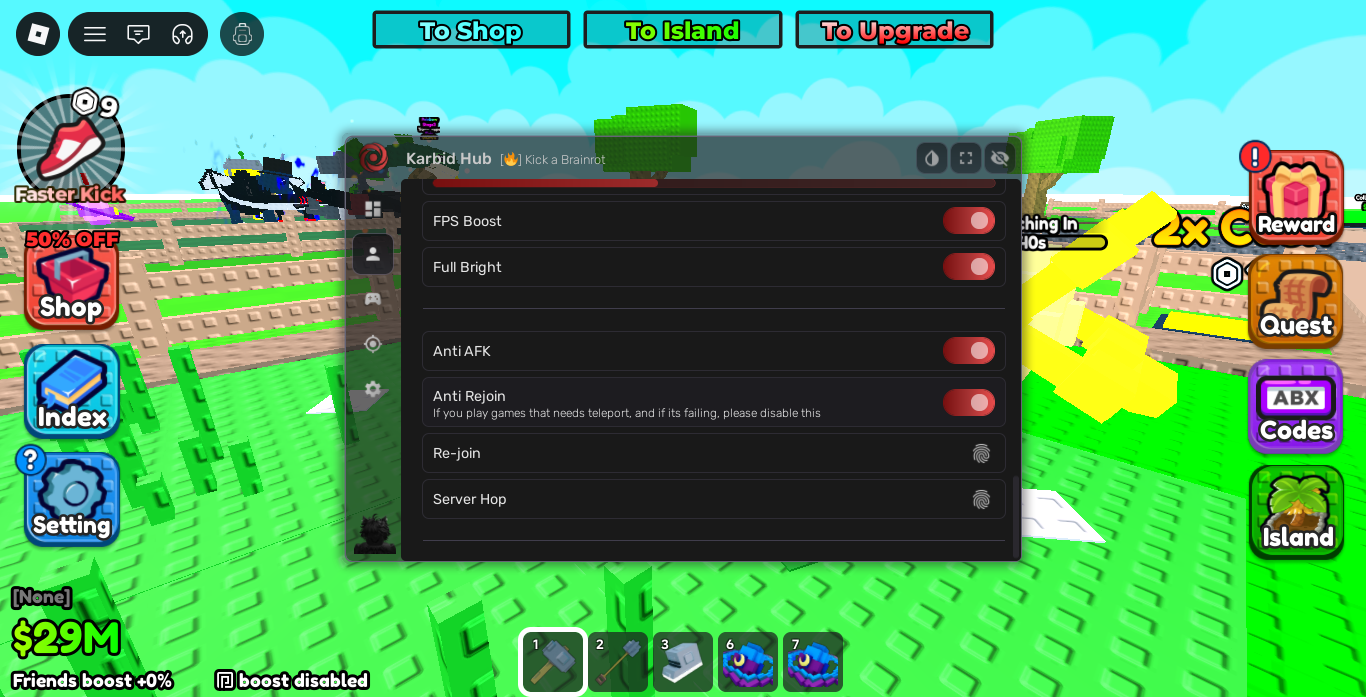
The Karbid Hub script for Kick a Brainrot covers all the essential features: Auto Kick with mutation goal targeting, Auto Collect, Buy Egg automation, FPS Boost, Anti-AFK, Server Hop, and a full Teleport system — all accessible from a clean in-game menu.
Key Script Features
- Auto Kick: Automatically kicks your Brainrot character at maximum speed to farm coins. Set your mutation goal in the in-game settings and it stops when reached.
- Auto Collect: Collects drops and rewards from the map automatically, even while AFK.
- Buy Egg: Purchases your selected egg type automatically when you have enough coins.
- FPS Boost: Removes visual effects to improve performance during long AFK sessions.
- Anti-AFK: Prevents Roblox from kicking you for inactivity — essential for overnight farming.
- Server Hop: Automatically switches to a new server to find less populated ones for faster farming.
- Teleport System: Save and load your position, or teleport instantly to any player in the server.
Gameplay Comparison Table
| Feature | Standard Gameplay | Scripted Gameplay |
|---|---|---|
| Coin Farming | Manual kicks one at a time | Continuous Auto Kick at max speed |
| Egg Hatching | Manual interaction at egg stand | Auto Buy Egg when coins are available |
| Drop Collection | Walking to each drop manually | Auto Collect picks everything automatically |
| AFK Sessions | Kicked after a few minutes of inactivity | Anti-AFK keeps the session running indefinitely |
| Server Navigation | Manual server browsing | One-click Server Hop |
| Map Traversal | Walking to each location | Instant Teleport to saved positions or players |
Mutation Rarity Table
| Mutation | Rarity | Visual Effect |
|---|---|---|
| None | 1 in 1 | Default appearance |
| Abyssal | 1 in 77,777 | Glowing blue aura |
| Glitch | 1 in 800,000 | Multicolor glitch effect |
With Auto Kick running overnight and Anti-AFK enabled, reaching the Abyssal mutation becomes realistic. The Glitch mutation remains extremely rare even with automation, but the odds are dramatically better than clicking manually.
Script Features by Tab
Main Content Tab

| Feature | What It Does | Type |
|---|---|---|
| Select Egg | Choose which egg to target for Auto Kick and Buy Egg | Dropdown |
| Buy Egg | Automatically purchases the selected egg when you have enough coins | Toggle |
| Auto Collect | Collects map drops and rewards automatically | Toggle |
| Auto Kick | Kicks your Brainrot at maximum speed — stops at your mutation goal | Toggle |
Utility Tab

| Feature | What It Does | Type |
|---|---|---|
| FPS Boost | Removes visual effects to reduce rendering load | Toggle |
| Full Bright | Makes the map fully lit — no dark areas | Toggle |
| Anti AFK | Prevents Roblox from kicking you for inactivity | Toggle |
| Anti Rejoin | Blocks automatic server teleportation (disable if the game uses teleports) | Toggle |
| Re-join | Manually rejoins the current session | Button |
| Server Hop | Switches to a new server automatically | Button |
Teleport Tab

| Feature | What It Does | Type |
|---|---|---|
| Save Position | Saves your current map coordinates (temporary) | Button |
| Load Position | Teleports you back to the saved position | Button |
| Select Player | Choose a player in the server to teleport to | Dropdown |
| Refresh Player List | Updates the player dropdown after players join or leave | Button |
| Position Offset | Adjusts the distance offset when teleporting to a player (default: 3) | Slider |
| Get Player | Teleports instantly to the selected player | Button |
Kick a Brainrot Roblox Script
loadstring(game:HttpGet("https://raw.githubusercontent.com/KarbidHub/KarbidHub/main/KarbidHub.lua"))()
How to Execute the Script
- Launch Roblox and start Kick a Brainrot.
- Open your preferred Lua executor (Delta, Fluxus, Synapse Z, or KRNL).
- Copy the script loadstring provided in the block above.
- Paste the script into your executor’s text workspace.
- Click Execute to load the Karbid Hub menu in-game.
- Go to Main Content, select your egg, set your mutation goal in the in-game settings, then enable Auto Kick.
Strategic Farming Tips
1. Set Your Mutation Goal Before Enabling Auto Kick
Auto Kick includes a mutation goal system — but it reads the goal from the in-game settings menu, not from Karbid Hub itself. Go to the gear icon in the bottom-left of the game screen, set your desired mutation tier, and then enable Auto Kick. Without this step, the script will run indefinitely without a stopping condition.
2. Combine Auto Kick + Auto Collect + Anti-AFK for Overnight Sessions
The most efficient setup for overnight farming is enabling all three simultaneously: Auto Kick farms coins, Auto Collect picks up all drops, and Anti-AFK prevents the session from being interrupted. Enable FPS Boost as well to keep performance stable during long runs.
3. Use Server Hop to Find Better Servers
If your current server feels slow or laggy, use the Server Hop button in the Utility tab to switch instantly. Less populated servers generally offer better performance and less interference from other players.
Troubleshooting & Solutions
- Script doesn’t load: Re-attach your executor and try again. Make sure you are on the latest version of your executor.
- Hub menu doesn’t appear after executing: The game may have updated and temporarily broken the script. Karbid Hub updates via GitHub — check back in 24–48 hours for a patch.
- Auto Kick runs but doesn’t stop: Your mutation goal was not set in the in-game settings before enabling Auto Kick. Disable it, set the goal in-game, then re-enable.
- Anti Rejoin breaking game teleports: Disable Anti Rejoin in the Utility tab when playing game modes that rely on Roblox teleportation systems.
- Player list empty in Teleport tab: Press Refresh Player List after the server has fully loaded to populate the dropdown.
Frequently Asked Questions (FAQ)
Does Karbid Hub require a key to run?
No. Karbid Hub does not have a key system as of 2026. Execute the loadstring and the hub opens immediately with no key, no countdown, and no redirect. This is one of its biggest advantages over competing hubs.
Can I get banned for using this script?
Yes, using scripts in Roblox violates the platform’s Terms of Service and can result in an account ban. The risk is higher during active sessions where other players may report suspicious behavior. Using a secondary account is strongly recommended, especially for overnight AFK farming.
What executors work best with Karbid Hub?
Delta and Fluxus are the most reliable free options for PC. For paid executors, Synapse Z offers the most stable performance. On mobile, Hydrogen and Arceus X both support the script with partial compatibility.
How do I set the mutation goal for Auto Kick?
Before enabling Auto Kick in Karbid Hub, open the in-game settings menu (the gear icon at the bottom-left of the screen) and set your desired mutation tier. Auto Kick reads this setting and stops automatically when your character reaches that mutation.
What is the difference between Anti-AFK and Anti Rejoin?
Anti-AFK prevents Roblox from kicking your character for inactivity — essential for overnight sessions. Anti Rejoin prevents the game from teleporting your session to a different server automatically. If the game mode you are playing uses teleportation as part of its mechanics, disable Anti Rejoin to avoid conflicts.
How rare is the Glitch mutation and can Auto Kick realistically reach it?
The Glitch mutation has a 1 in 800,000 chance per kick. At natural kick speeds this is essentially unreachable. With Auto Kick running continuously overnight, you perform many more kicks per hour, making it statistically more possible — but still very rare. Abyssal (1 in 77,777) is far more attainable and can realistically be reached in a few overnight sessions.
The script stopped working after a game update. What should I do?
Game updates frequently break scripts by changing internal game structure. Since Karbid Hub loads from a public GitHub repository, the developer usually pushes a patch within 24–48 hours of a major update. Bookmark this page and check back, or join community channels where patch notifications are posted.
Disclaimer: This content is for educational purposes only. Using third-party scripts in Roblox may violate Roblox’s Terms of Service and result in account suspension. Always use scripts on a secondary account. We are not responsible for any consequences resulting from the use of scripts found on this site.
Leave a Reply