Musical Chairs Script: Auto Teleport to Chair, Auto Win & Speed Hack
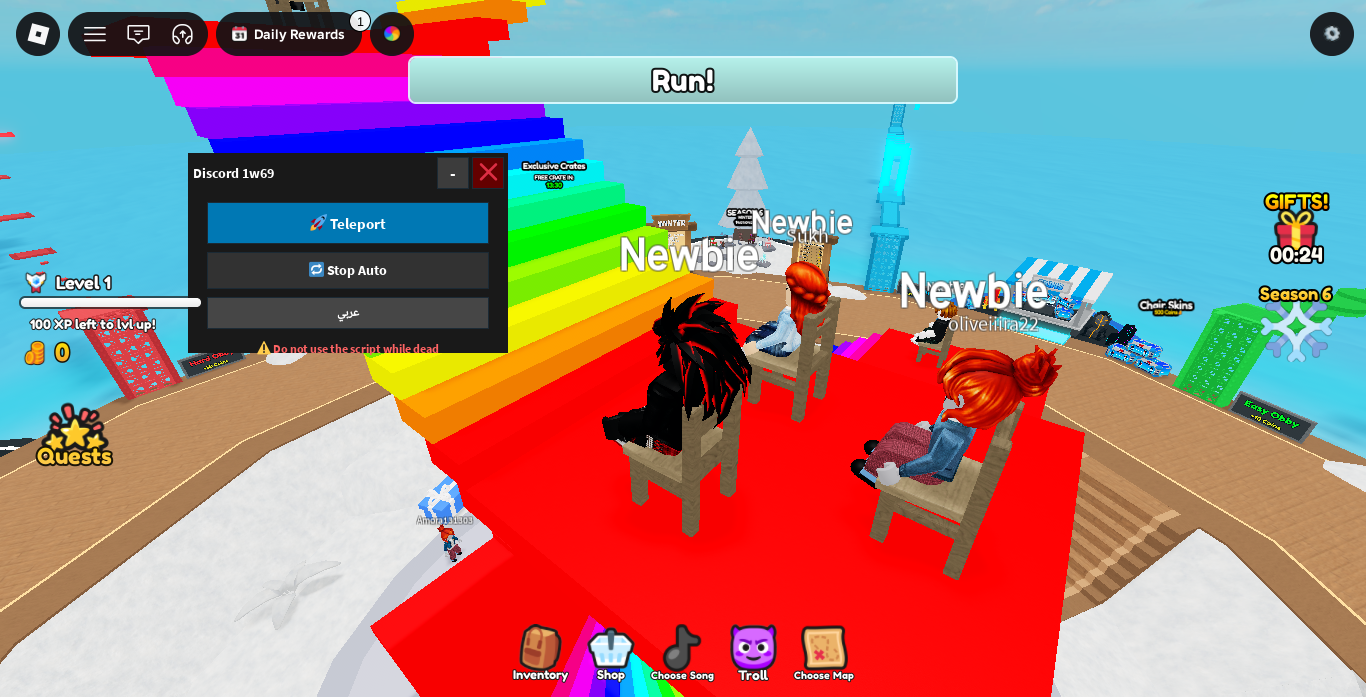
Musical Chairs is a fast-paced multiplayer Roblox party game inspired by the classic real-world elimination game. Players circle around a reducing set of chairs while music plays, and the moment the sound cuts off, everyone must scramble to claim a seat before being eliminated.
As rounds progress and fewer chairs remain, competition grows intense. Using a functional utility script allows you to automatically target open chairs, instant-teleport when music stops, and adjust your movement speed to guarantee a seat every round.
Key Script Features
- Auto Teleport to Chair: Instantly teleports your character directly on top of an unoccupied chair as soon as a new round begins or music pauses.
- Instant Seat Claim: Automatically forces your character into an available seat state before competing players can interact with it.
- Custom WalkSpeed & JumpPower: Increase your movement speed to sprint around the circle effortless and outpace laggy opponents.
- Auto Win Farm: Continuous automated loop that teleports you to empty seats round after round to climb win leaderboards AFK.
Gameplay Comparison: Standard vs. Scripted
| Feature | Standard Gameplay | Scripted Gameplay |
| Seat Claim Speed | Dependent on ping and manual reaction | Instant automated teleportation |
| Elimination Risk | High during final 1v1 rounds | Near zero with auto-targeting |
| Movement Control | Standard walk speed | Adjustable speed slider (16 to 120+) |
| AFK Compatibility | Requires manual participation | Fully automated seat hunting |
Musical Chairs Roblox Script
Lua
local Rayfield = loadstring(game:HttpGet('https://sirius.menu/rayfield'))()

local Window = Rayfield:CreateWindow({
   Name = "Musical Chairs Interface",
   LoadingTitle = "Loading System...",
   LoadingSubtitle = "Chair Automation",
   ConfigurationSaving = { Enabled = false },
   Discord = { Enabled = false }
})

local MainTab = Window:CreateTab("Automation", 4483362458)
local PlayerTab = Window:CreateTab("Player", 4483362458)

local autoSeatState = false
local walkSpeedValue = 16

local function findAvailableChair()
    for _, v in ipairs(workspace:GetDescendants()) do
        if (v:IsA("Seat") or v:IsA("VehicleSeat")) and not v.Occupant then
            return v
        end
    end
    return nil
end

MainTab:CreateToggle({
   Name = "Auto Teleport to Chair",
   CurrentValue = false,
   Flag = "AutoSeatFlag",
   Callback = function(Value)
      autoSeatState = Value
      task.spawn(function()
         while autoSeatState do
            task.wait(0.1)
            pcall(function()
               local chair = findAvailableChair()
               if chair and autoSeatState then
                  local hrp = game.Players.LocalPlayer.Character:FindFirstChild("HumanoidRootPart")
                  if hrp then
                     hrp.CFrame = chair.CFrame + Vector3.new(0, 2, 0)
                  end
               end
            end)
         end
      end)
   end,
})

MainTab:CreateButton({
   Name = "Teleport to Empty Chair Now",
   Callback = function()
      pcall(function()
         local chair = findAvailableChair()
         if chair then
            local hrp = game.Players.LocalPlayer.Character:FindFirstChild("HumanoidRootPart")
            if hrp then
               hrp.CFrame = chair.CFrame + Vector3.new(0, 2, 0)
            end
         end
      end)
   end,
})

PlayerTab:CreateSlider({
   Name = "WalkSpeed",
   Range = {16, 120},
   Increment = 1,
   Suffix = "Speed",
   CurrentValue = 16,
   Flag = "SpeedFlag",
   Callback = function(Value)
      walkSpeedValue = Value
      pcall(function()
         game.Players.LocalPlayer.Character.Humanoid.WalkSpeed = walkSpeedValue
      end)
   end,
})

game.Players.LocalPlayer.CharacterAdded:Connect(function(char)
   char:WaitForChild("Humanoid").WalkSpeed = walkSpeedValue
end)
Step-by-Step Execution Guide
- Launch Roblox and join Musical Chairs.
- Open your trusted Lua executor.
- Copy the script code provided in the section above.
- Paste the script into your executor window.
- Click Execute to open the interface controls.
Strategic Farming Tips
1. Manual Triggering in Final Rounds
During 1v1 or 1v2 final rounds, using the Teleport to Empty Chair Now button right as the music stops gives you an instant win without raising suspicion in full automatic mode.
2. Balanced WalkSpeed Setup
Keep your WalkSpeed set around 30 to 45. This gives you enough velocity to circle chairs faster than anyone else while avoiding unnatural teleportation flags.
Troubleshooting & Solutions
- Character Glitching Above Seats: If your character teleports above the seat without sitting down, jump once to force the seat interaction mechanic.
- Script Fails to Find Chairs: Re-execute the script if the map resets between full server matches or map changes.
- Menu Disappears: Toggle keybinds or execute again if your mobile/desktop executor closes the window overlay.
Frequently Asked Questions (FAQ)
Is this Musical Chairs script free to use?
Yes, the script is completely free to execute and requires no key system.
Does Auto Teleport work on mobile executors?
Yes, the user interface and position triggers function properly across both mobile and PC executors.
Will this script work in custom map rotation modes?
Yes, the search function dynamically scans for open seat components regardless of map design or theme.
Leave a Reply