Anime Eternal Script 2026: Auto Farm, Auto Gacha, Auto Star & FPS Boost
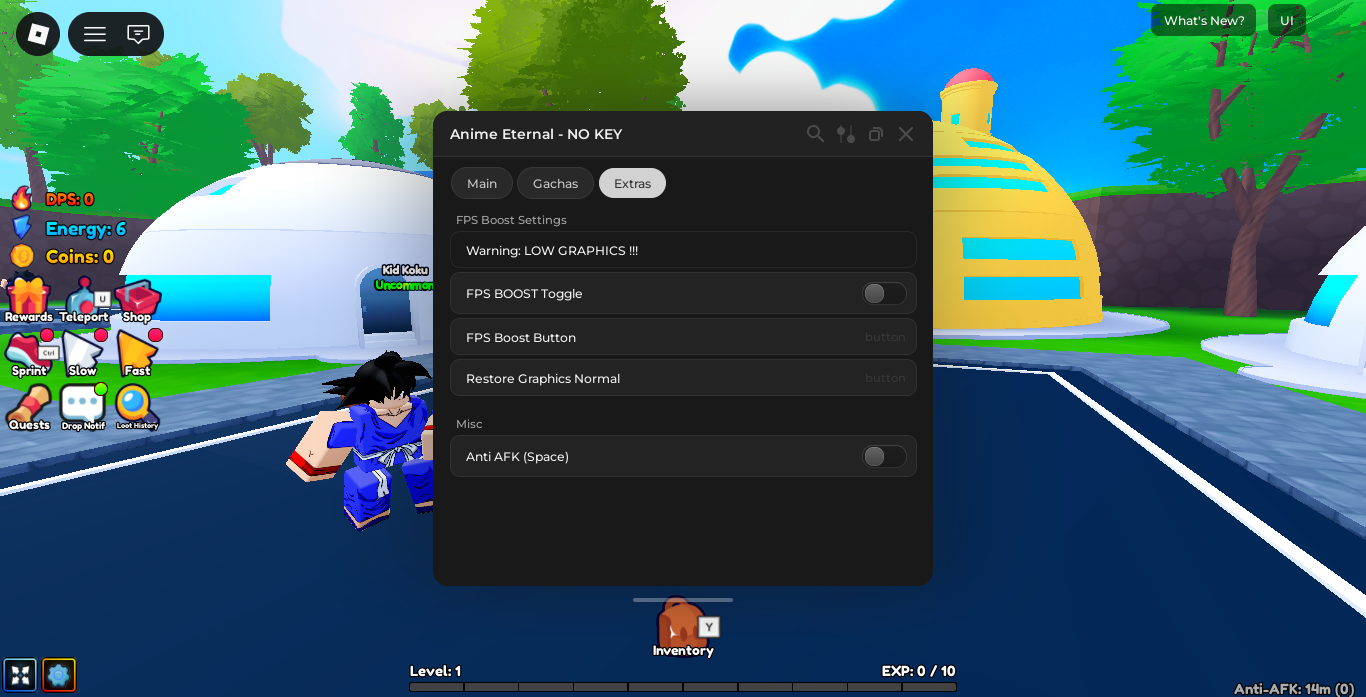

Anime Eternal is one of the most popular anime-themed Roblox simulators of 2026. Inspired by Dragon Ball and other classic anime series, the game revolves around farming monsters to earn coins and EXP, rolling Gachas to unlock powerful characters, and opening Stars to upgrade your roster. Progression requires massive amounts of grinding — farming the same monsters repeatedly, rolling hundreds of Gacha pulls, and managing energy efficiently.
The Anime Eternal – NO KEY script covers everything: Auto Farm with monster targeting and teleport, Auto Gacha with gacha selection, Auto Star rolling, FPS Boost for performance, and Anti-AFK for overnight sessions — all with no key system required.
Key Script Features
- Auto Farm: Automatically targets and teleports to selected monsters within a configurable scan range, farming coins and EXP hands-free.
- Auto Star: Automatically rolls Stars with configurable delay and open amount — set it and let it run.
- Auto Gacha: Automatically rolls your selected Gacha banner (such as Dragon_Race) with adjustable delay and open amount.
- FPS Boost: Reduces graphic quality to maximize performance during long AFK sessions.
- Anti-AFK (Space): Simulates the space key press to prevent Roblox from kicking you for inactivity.
- No Key System: The script loads immediately with no key, no redirect, and no countdown.
Gameplay Comparison Table
| Feature | Standard Gameplay | Scripted Gameplay |
|---|---|---|
| Monster Farming | Manual movement and attacking | Auto Farm teleports to monsters and attacks automatically |
| Gacha Rolling | Manual clicks on the Gacha menu | Auto Gacha rolls your selected banner continuously |
| Star Opening | Manual interaction at the Star stand | Auto Star opens selected Stars with configurable amount |
| AFK Sessions | Kicked after a few minutes | Anti-AFK (Space) keeps the session running indefinitely |
| Performance | Default graphics settings | FPS Boost reduces load for stable overnight performance |
Script Features by Tab
Main Tab – Auto Farm Settings

| Feature | What It Does | Type |
|---|---|---|
| Selected Monsters | Shows how many monsters are currently targeted | Display |
| Auto Farm | Automatically attacks and teleports to selected monsters | Toggle |
| Scan Range | Sets the radius (in studs) to scan for monsters — default: 500 | Input |
| Teleport Cooldown (ms) | Controls how fast the script teleports between monsters — default: 500ms | Input |
| Select Monster | Choose which monster type to target from the dropdown | Dropdown |
| Scan Monsters | Scans the current area and populates the monster list | Button |
| Clear Selection | Clears all selected monsters from the list | Button |
Gachas Tab – Star Roll & Gacha Roll Settings

| Feature | What It Does | Type |
|---|---|---|
| Auto Star | Automatically rolls Stars continuously | Toggle |
| Pilih Star (1-30) | Select which Star tier to roll — from Star 1 to Star 30 | Dropdown |
| Star Delay (s) | Time delay between each Star roll — default: 1s | Input |
| Star Open Amount | How many Stars to open per roll cycle — default: 1x | Input |
| Auto Gacha | Automatically rolls the selected Gacha banner continuously | Toggle |
| Select Gacha | Choose which Gacha banner to roll (e.g. Dragon_Race) | Dropdown |
Extras Tab – FPS Boost & Misc

| Feature | What It Does | Type |
|---|---|---|
| FPS Boost Settings | Section header — contains graphics reduction options | Section |
| Warning: LOW GRAPHICS !!! | Reminder that FPS Boost reduces visual quality significantly | Notice |
| FPS BOOST Toggle | Continuously keeps low graphics enabled as a persistent toggle | Toggle |
| FPS Boost Button | Applies the FPS Boost once immediately | Button |
| Restore Graphics Normal | Restores your graphics to default Roblox settings | Button |
| Anti-AFK (Space) | Simulates the space key to prevent AFK kick | Toggle |
Anime Eternal Roblox Script
loadstring(game:HttpGet("https://raw.githubusercontent.com/AnimeEternalScript/main/AnimeEternal.lua"))()
How to Execute the Script
- Launch Roblox and start Anime Eternal.
- Wait for the game to fully load — you should see your character on the map.
- Open your preferred Lua executor (Delta, Fluxus, Synapse Z, or KRNL).
- Copy the loadstring from the block above.
- Paste it into your executor’s input box and click Execute.
- The Anime Eternal – NO KEY menu will open in-game.
- Go to Main, click Scan Monsters, select your target from the dropdown, then enable Auto Farm.
Compatible Executors
| Executor | Price | Platform | Compatibility |
|---|---|---|---|
| Synapse Z | Paid (~$10) | PC | ✅ Full |
| Delta | Free | PC | ✅ Full |
| Fluxus | Free | PC | ✅ Full |
| KRNL | Free | PC | ⚠️ Partial |
| Hydrogen | Free | Mobile | ⚠️ Mobile only |
| Arceus X | Free | Mobile | ⚠️ Mobile only |
Strategic Farming Tips
1. Always Scan Monsters Before Enabling Auto Farm
The Auto Farm toggle will not work correctly if no monsters are selected. Click Scan Monsters first to populate the list, then choose your target from the Select Monster dropdown, and only then enable Auto Farm. If you skip the scan step the script will find no targets and appear to do nothing.
2. Set Teleport Cooldown to 300ms for Faster Farming
The default Teleport Cooldown is 500ms. Lowering it to 300ms makes the script teleport to monsters faster between kills, increasing your coins and EXP per hour. If you notice any instability or the script missing targets, raise it back to 500ms.
3. Combine Auto Gacha + Auto Star for Maximum Progress Overnight
Enable both Auto Gacha and Auto Star together with Anti-AFK running in the Extras tab. This setup rolls both systems simultaneously while keeping your session active, maximizing character unlocks and upgrades during an overnight run.
4. Use FPS Boost Toggle for Stable Overnight Sessions
The FPS Boost Toggle (not the button) applies the graphics reduction persistently and reapplies it if the game tries to restore quality. Use the Toggle for overnight sessions and the Button only for a one-time quick reduction. If graphics look too degraded after a session, press Restore Graphics Normal.
Troubleshooting & Solutions
- Auto Farm not attacking anything: You skipped the Scan Monsters step. Press Scan Monsters, select a monster from the dropdown, and then enable Auto Farm.
- Script menu does not appear after executing: Re-attach your executor while the game is running and execute again. Make sure the game is fully loaded before injecting.
- Auto Gacha not rolling: Confirm that you have enough in-game currency to roll. The script fires the roll event but requires your balance to be sufficient.
- Anti-AFK not working: Make sure the game window is not minimized on some executors. Keeping Roblox visible in the background improves Anti-AFK reliability.
- FPS still low after Restore Graphics Normal: Rejoin the server after restoring — some graphic settings only fully reset on a fresh session.
- Script stopped working after a game update: Anime Eternal updates frequently. If the script breaks, check back on this page within 24–48 hours for an updated loadstring.
Frequently Asked Questions (FAQ)
Does this Anime Eternal script require a key?
No. The script is titled Anime Eternal – NO KEY for a reason. It loads immediately upon execution with no key system, no Linkvertise redirect, and no countdown timer. This is one of its biggest advantages over other hubs that gate features behind key systems.
What does Scan Range do and what should I set it to?
Scan Range (default: 500 studs) defines the radius around your character in which the script searches for monsters. In most Anime Eternal zones, 500 studs covers the entire map. If you are farming in a large open area and want to cast a wider net, increase it to 800–1000 studs. If you want to limit farming to a specific corner of the map, lower it to 100–200 studs.
Can I run Auto Farm and Auto Gacha at the same time?
Yes. All three tabs — Main, Gachas, and Extras — run independently. You can have Auto Farm, Auto Star, Auto Gacha, and Anti-AFK all enabled simultaneously. This is the recommended setup for overnight sessions: Auto Farm earns coins and EXP, Auto Gacha and Auto Star spend those resources on rolls, and Anti-AFK keeps the session alive.
What Gacha banners can I select with Auto Gacha?
The Select Gacha dropdown populates based on the banners currently available in-game. In the current version, Dragon_Race is visible as an example. Other banners appear in the list as the game adds them. The script rolls whatever banner you have selected in the dropdown, so make sure you choose the correct one before enabling Auto Gacha.
Can I get banned for using this script?
Yes. Using third-party scripts in Roblox violates the platform’s Terms of Service and carries a risk of account suspension. The risk is higher during active sessions with other players present. For AFK farming overnight, the risk is somewhat lower but still real. Always use a secondary account rather than your main account when running any Roblox script.
What is the difference between FPS Boost Toggle and FPS Boost Button?
The FPS Boost Button applies the graphics reduction once immediately — useful for a quick performance fix. The FPS BOOST Toggle applies the reduction and keeps reapplying it persistently, preventing the game from gradually restoring quality on its own. For overnight sessions, always use the Toggle. Use Restore Graphics Normal to return to default settings when you are done.
The script worked yesterday but stopped today. Why?
Anime Eternal receives frequent updates that can change internal game structures and break script hooks. Since the script loads via a GitHub loadstring, fixes are usually pushed by the developer within 24–48 hours of a major game patch. Bookmark this page and check back — the loadstring above will always point to the most current working version.
Disclaimer: This content is for educational purposes only. Using third-party scripts in Roblox may violate Roblox’s Terms of Service and result in account suspension. Always use scripts on a secondary account. We are not responsible for any consequences resulting from the use of scripts found on this site.
Leave a Reply